A comprehensive security analysis has revealed a widespread vulnerability affecting Firebase-powered mobile applications, with over 150 popular apps inadvertently exposing sensitive user data through misconfigured Google Firebase services. The scope of this security crisis dwarfs previous incidents, potentially affecting thousands of applications with millions of downloads worldwide. Security researcher analysis of approximately 1,200 mobile applications […]
Attackers have discovered a way to exploit Google’s core services, Google Meet, YouTube, Chrome update servers and more using a technique called domain fronting. By making their malicious traffic appear as legitimate connections to high-trust domains, adversaries can tunnel data through Google’s backbone infrastructure without raising suspicion. This research builds on previous demonstrations of tunneling […]
Chromium-based browsers, including Chrome, Edge, and Brave, manage installed extensions via JSON preference files stored under %AppData%\Google\User Data\Default\Preferences (for domain-joined machines) or Secure Preferences (for standalone systems).
Synacktiv research indicates that by directly altering these files, attackers can make the browser load any extensions without the user’s consent or involvement from the Chrome Web Store.
A successful compromise involves three technical prerequisites: pre-calculating the extension ID, generating valid Message Authentication Codes (MACs) for both the extension entry and the developer_mode flag, and bypassing enterprise policy controls.
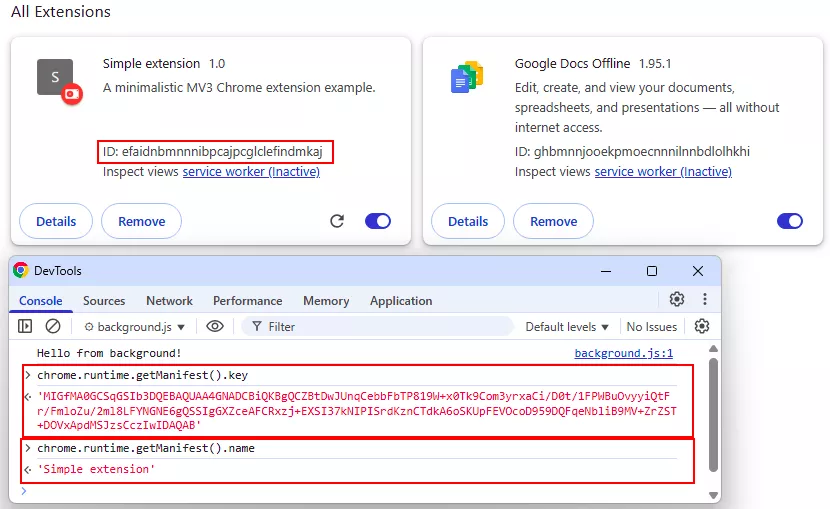
Extension IDs are deterministically derived from the extension’s public key or installation path via a SHA-256 hash truncated to 32 hex characters and mapped to a custom alphabet (a–p).
Chromium’s integrity checks use an HMAC seeded with a static value extracted from resources.pak specifically resource file 146 to sign critical JSON keys.
Attackers reverse this HMAC algorithm to compute valid MACs for extensions.settings.<crx_id> and extensions.developer_mode, enabling silent registration of their backdoor extension.
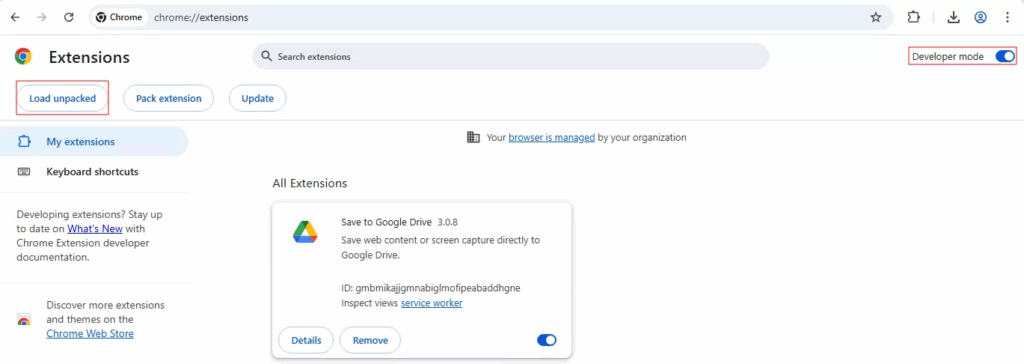
Developer mode in the browser extension
Bypassing Chrome Extension GPO Controls
Enterprise environments commonly deploy GPOs to whitelist or blacklist extensions through policies like ExtensionInstallAllowlist and ExtensionInstallBlocklist.
Three advanced evasion methods undermine these controls:
Synacktiv stated that by reusing the RSA public key of a corporate-approved extension (e.g., Adobe Acrobat Reader for Chrome), an attacker generates a matching extension ID.
They then inject a malicious unpacked extension under that ID, bypassing hash-based allowlists.
When an unpacked extension and a store-installed extension share the same ID, Chromium prioritizes the unpacked version. This collision allows attackers to override trusted plugins stealthily.
Extension Stomping
Windows applies policies in LSDOU order. Although Chrome policies reside under HKCU\Software\Policies\Google\Chrome, a local administrator can delete or modify the registry entries, removing allowlists or blocklists to sidestep policy enforcement entirely.
Leveraging these techniques, threat actors can deploy extensions that intercept network traffic, scrape session cookies, execute background service workers, and inject content scripts into targeted web pages.
A proof-of-concept toolkit from Synacktiv demonstrates remote SMB-based deployment alongside a custom C2 server, enabling JavaScript execution within the browser process and undermining protections such as App-Bound Encryption.
Securing against this vector requires monitoring for unauthorized changes to preference files, validating registry policy integrity, and detecting anomalous extension registrations.
Without such detection mechanisms, “phantom extensions” offer a stealthy, persistent route to enterprise-wide data exfiltration and lateral movement.
A large-scale campaign targeting Mac users is leveraging fake GitHub pages to distribute information-stealing malware disguised as popular legitimate applications. Among the impersonated software are Malwarebytes for Mac, LastPass, Citibank, SentinelOne, and scores of other well-known brands. Although brand impersonation is nothing new, this campaign demonstrates the evolving tactics cybercriminals employ to entice users into […]
A sophisticated effort by Russian-linked actors is seeking to sway public opinion ahead of Moldova’s September 28, 2025, vote, raising concerns over foreign interference in the nation’s democratic process. Analysis of these sites revealed a technical fingerprint linking them to absatz.media—a Kremlin-tied propaganda outlet first registered in mid-2021. The overlap in unique code snippets and […]
A man in his forties has been arrested in West Sussex, England, in connection with a cyber-attack that has caused days of widespread disruption at several major European airports, including London’s Heathrow.
The UK’s National Crime Agency (NCA) confirmed the man was arrested on Tuesday evening on suspicion of offenses under the Computer Misuse Act and has since been released on conditional bail, reports the BBC.
The arrest is part of an ongoing investigation into a significant cyber incident that targeted Collins Aerospace, a U.S.-based company that provides critical check-in and baggage software to numerous airlines.
The attack, which began on Friday night, September 19, 2025, involved ransomware, according to the European Union’s cyber-security agency (ENISA).
Paul Foster, head of the NCA’s National Cyber Crime Unit, stated, “Although this arrest is a positive step, the investigation into this incident is in its early stages and remains ongoing”. He emphasized that cybercrime remains a “persistent global threat” causing significant disruption.
Widespread Airport Chaos
The failure of Collins Aerospace’s Muse software, a cloud-based platform for passenger processing, led to severe operational problems at airports across Europe, including those in Brussels, Dublin, and Berlin.
The disruption resulted in hundreds of flight delays and cancellations over the weekend and into the following week. Airports were forced to switch to manual systems, with staff using pen and paper for check-in and boarding procedures.
At Heathrow, extra staff were deployed to assist passengers, but delays continued. An internal memo revealed that Collins Aerospace was still struggling to bring its systems back online after a failed attempt to relaunch them on Monday.
The company has not provided a timeline for recovery and has urged airlines and ground handlers to plan for at least another week of manual workarounds.
On Wednesday, Berlin Airport reported that check-in and boarding were still “largely manual,” leading to “longer processing times, delays, and cancellations by airlines”.
Ransomware attacks are designed to paralyze a victim’s systems until a payment, typically in cryptocurrency, is made.
While the vast majority of flights at Heathrow are now operating as usual, the airport continues to advise passengers to check their flight status before traveling.
The UK’s National Cyber Security Center (NCSC) confirmed it is working with Collins Aerospace, affected airports, and law enforcement to understand the incident’s impact fully.
A new study has uncovered a method for silently installing custom extensions on Chromium-based browsers running in Windows domain environments. By exploiting how Chrome and its relatives store extension settings and security checks in preference files, attackers can inject arbitrary code into user browsers without triggering visible warnings. The research, validated on Chromium version 130 […]
Most businesses don’t make it past their fifth birthday – studies show that roughly 50% of small businesses fail within the first five years. So when KNP Logistics Group (formerly Knights of Old) celebrated more than a century and a half of operations, it had mastered the art of survival. For 158 years, KNP adapted and endured, building a transport business that operated 500 trucks
A sophisticated technique that allows attackers to execute malicious code directly in memory is gaining traction, posing a significant challenge to modern Endpoint Detection and Response (EDR) solutions.
This method, which involves an in-memory Portable Executable (PE) loader, enables a threat actor to run an executable within an already trusted process, effectively bypassing security checks that primarily monitor files written to disk.
Loading PE in Memeory
According to a user with the alias G3tSyst3m, the technique highlights a critical blind spot in some security postures, allowing secondary payloads to be deployed stealthily after initial access is gained.
This “fileless” attack vector is particularly dangerous because it operates under the radar. An EDR solution may validate and approve an initial application, deeming it safe to run.
However, once that trusted process is active, it can be manipulated to download and execute another PE file, such as a remote access trojan or info-stealer, entirely within its own memory space.
Because the malicious executable never touches the file system, traditional antivirus and EDR tools that rely on file scanning and disk-based heuristics may fail to detect the threat.
In-Memory PE Loader Leveraged
The attack begins by leveraging the legitimate process to download a PE file from a remote source, such as a GitHub repository.
Using standard Windows APIs like InternetOpenUrlA and InternetReadFile, the code fetches the executable and stores it in a memory buffer.
This initial step is often mistaken for delicate network activity, allowing the payload to be smuggled onto the target system without raising alarms. Once the PE file resides in memory as a byte array, the loader meticulously reconstructs it for execution.
Putty downloaded using PE
This reconstruction process manually emulates the functions of the Windows operating system’s own loader. At a high level, the loader performs several critical steps:
Parses PE Headers: It reads the DOS and NT headers of the downloaded file to understand its structure, including its sections and dependencies.
Allocates Memory: It uses VirtualAlloc to reserve a new block of memory within the host process to map the executable image.
Maps Sections: The loader copies the PE headers and sections (like .text for code and .data for variables) from the buffer into the newly allocated memory space according to their virtual addresses.
Resolves Imports: It loads any required Dynamic-Link Libraries (DLLs) and resolves the addresses of external functions the PE needs to run. This is done by using LoadLibraryA and GetProcAddress.
Applies Relocations: It adjusts any hardcoded addresses in the code to ensure they point to the correct locations in memory.
After successfully mapping the PE file and resolving its dependencies, the final steps involve adjusting memory permissions and triggering execution.
The loader uses VirtualProtect to set the appropriate permissions for each section, for instance, marking the code section as executable and the data section as readable/writable.
This mirrors the behavior of a legitimately loaded program and is crucial for the code to run without crashing the process. With the memory correctly prepared, the loader simply calls the PE file’s entry point, launching the malicious code.
This method has proven effective in red team engagements and has been observed bypassing prominent EDR solutions like Microsoft Defender for Endpoint (XDR) and Sophos XDR.
While not entirely foolproof, especially against advanced AI and machine learning-based detection that can flag anomalous process behavior over time, custom-built PE loaders remain a potent tool for evading detection.
The technique underscores the need for security solutions that can perform deep memory inspection and behavioral analysis, moving beyond a reliance on file-based threat intelligence.
A newly disclosed flaw in OnePlus OxygenOS lets any app on a device read SMS and MMS messages without asking the user. Tracked as CVE-2025-10184, the issue stems from a permission bypass in the Telephony content provider (com.android.providers.telephony). Normally, apps must hold the Android READ_SMS permission and prompt the user before accessing text messages. In […]